
In a previous post I discussed the PC Engine and PC Engine mini in great detail. I’ve since updated that article with much of the content of this post, so if you haven’t read the full post I recommend it – it’s one of the most in-depth articles on the PC Engine mini available today.
If your interest is purely in the topic of error screens, I will begin by repeating some of the history of the PC Engine and the PC Engine mini discussed in the previous article.
PC Engine
The PC Engine was a home video game console developed through a joint venture between Hudson Soft and NEC. Released in Japan in 1987, it was a commercial success, competing favourably with the well-known Nintendo Famicom/NES console of the era. Though technically an 8-bit console (having an 8-bit CPU), it included a 16-bit graphics processor, making it a remarkably powerful machine for its time with impressive colour and sound capabilities.
Games originally shipped on small, credit-card-like media called HuCards, rather than bulkier cartridges many consoles were using. Given the size, these had limited storage, and the following year, NEC released a Compact Disc attachment called the CD-ROM². This allowed larger and more complex games to be shipped on CD. This was followed by the release of the Super CD-ROM², an updated version of the CD-ROM², and the PC Engine Duo, an all-in-one unit that combined the PC Engine with the Super CD-ROM².

In 1994 NEC introduced the Arcade Card, which increased the amount of onboard RAM of the Super CD-ROM² System to 2 MB. This reduced load times and enabled better graphics, resulting in more arcade accuracy in game ports.
There are many other facts about the system which I won’t discuss here, as this is the basic knowledge we need going forward. If you want to read more read my full review of the PC Engine mini.
PC Engine mini
In 2020, Konami, who now own the rights to Hudson Soft and thus the PC Engine, released the PC Engine mini (in Japan), the PC Engine CoreGrafx mini in Europe, and the TurboGrafx-16 mini (in the USA).
Each unit is a smaller version of the original console, with a controller of approximately the original size, though connected via a more-modern USB-A connector to the device. Although called a “mini”, the original PC Engine was already very small, and this mini version is only a little bit smaller than the original.

The PC Engine mini and CoreGrafx mini include 58 games, though 5 of them are repeats (versions for the PC Engine and TurboGrafx-16 are included and are identical). The TurboGrafx-16 mini comes with 57 games, though 5 are once again repeats.
The games range beyond just games that shipped on HuCards for the PC Engine – they also include TurboGrafx-16 HuCard games, PC Engine and TurboGrafx-16 CD-ROM games for the CD-ROM² add-on, PC Engine SuperGrafx HuCard games, and a PC Engine CD-ROM game for the Super CD-ROM² add-on with Arcade Card upgrade.
In total the PC Engine mini has:
| 19 | PC Engine HuCard games |
| 22 | TurboGrafx-16 HuCard games (23 on the TurboGrafx-16 mini) |
| 12 | PC Engine CD-ROM games for the CD-ROM² add-on (10 on the TurboGrafx-16 mini) |
| 2 | TurboGrafx-16 CD-ROM games for the CD-ROM² add-on |
| 2 | PC Engine SuperGrafx HuCard games |
| 1 | PC Engine CD-ROM game for the Super CD-ROM² add-on with Arcade Card upgrade |
Card Error Screens
As mentioned earlier, an add-on CD-ROM drive was available for the PC-Engine and TurboGrafx-16. Using the CD-ROM drive required a special HuCard – System Card (version 1.0 or 2.x) or Super System Card (version 3.0) – depending on the game. Further, some games required an Arcade Card which contained extra RAM.
If you tried to play a CD-ROM game without the correct System Card/Arcade Card, the system would show an error message on screen. These error screens sometimes involved graphics, music, voice, and even mini games.
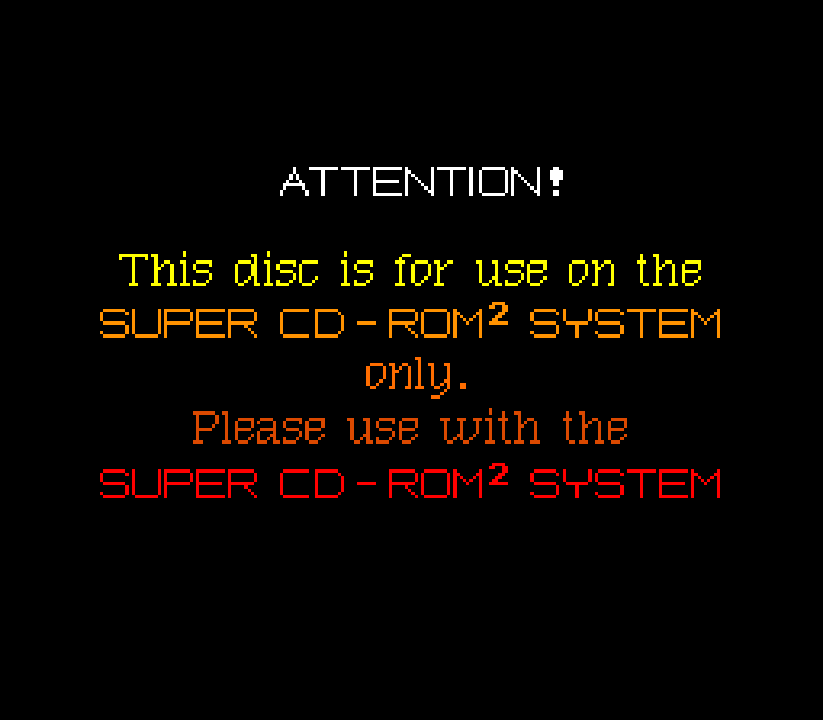
On a real PC Engine we could test these error screens out quite easily: just pull out or swap the System Card. But can we do this with an emulated system like the PC Engine mini?
Card Error Screens on the PC Engine mini
It turns out that, yes, you can. Well, at least on 11 games.
In total there are 15 CD-ROM games on the PC Engine mini. 11 of these games require the Super System Card 3.0 or Arcade Card. With these games we can trigger this error screen by holding SELECT as we start those games (basically this simulates using System Card version 2.1, thus triggering the error screen as the games require version 3.0 or the Arcade Card).
The following are the games that will trigger the error screen, with samples and discussion of the error shown.
Akumajō Dracula X: Chi no Rondo
The error screen here is actually a playable game. Though it is barely a game, and more a tech demo. The game is called Akumajyo Dracula Peke – the gameplay has you kill a few enemies while moving to the right. This hidden game is discussed in the full PC Engine mini review.
The first screen shown has the text あくまぢょお どらきゅら (Akumadyoo Dorakyura). The actual game series is called 悪魔城ドラキュラ (Akumajō Dorakyura / Demon Castle Dracula). There is a deliberate misspelling here, and the use of hiragana plus multi-coloured poorly written characters gives the impression of a children’s game, instead of the expected, more adult, game. Under the text is an X with ぺけ (Peke) meaning something is wrong.
The next screen translates as “The bloodline’s fate cannot be severed unless it’s on a SUPER CD-ROM².” You can play the mini-game from here, such as it is.
The final screen is the formal error screen, and translates as “This CD-ROM disc is game software exclusively for the SUPER CD-ROM². Please run it using a SUPER SYSTEM CARD.”
Bomberman: Panic Bomber
This error screen is a static image of multiple Bomberman clones. There is no sound.
The text simply reads, “The Card Ver. is incorrect. Please reboot using a Super System Card or an Arcade Card.”
Cho Aniki
The error screen here is a static image showing a muscly ninja in speedos. This unusual image actually makes sense, given the game is well known for its bizarre images and homoerotic themes.
The text here reads “The card is wrong”, though it uses a pun that combines chigaimasu (“it’s wrong”) with the English word “muscle”, to form “chigaimassuru”. The ninja is saying “ugh”. Hilarious.
Ginga Fukei Densetsu Sapphire
The error screen here is a static image of the game’s character, Sapphire, in a bikini. Why a bikini? 1990s Japan. The Japanese often included “fan service”, which is basically content meant to reward or excite the viewer, and for the time most gamers were young boys. It would likely be considered poor taste today.
There is no sound.
The text simply reads, “Please insert the Arcade Card”.
Gradius II: Gofer no Yabō
The error screen here shows a small animated cut-scene or movie at the bottom of the screen. If you wait until the movie is over you hear a voice-over (in English).
The text simply reads, “This CD-ROM disc is game software exclusively for the SUPER CD-ROM². Please run it using a SUPER SYSTEM CARD.”
The voice-over in English says, “SUPER SYSTEM CARD is required to play this game.”
Lords of Thunder
This is a very boring error screen, in English.
There is no sound and no graphics to speak of.
Snatcher
The error screen is a static image showing the robot navigator from the game, attempting to run the game and getting a surprise. There is no sound.
The text reads, “This CD-ROM disc is game software exclusively for the SUPER CD-ROM² system.
Please run it using a SUPER CD-ROM² system.”
In small blue text it adds, “Sorry”. The robot is surprised and is saying “Huh?!”. And an arrow points to the machine below and reads, “Old-type PC Engine”.
Spriggan Mark 2: Re-Terraform Project
The error screen has text, and a parallax starfield that moves smoothly around the text, changing direction and acceleration at certain times. There is no sound.
The text simply reads, “This game is exclusively for the SUPER CD-ROM system. A System Card of VER 3.00 or higher is required.”
Star Parodier
This error screen is static, but with a great musical tune playing in the background. The image shows Bomberman, holding the wrong HuCard.
The text reads, “You can’t PLAY with this System Card. Please swap it out for a card of Ver. 3.0 or higher and Power On. I’m waiting for you!”
Tengai Makyō II: Manji Maru
This error screen appears static at first, showing the villain Dr Deron. A tune plays repeatedly in the background. However, you can press button I or II to change the image, cycling between images of Dr Deron, Dr Deroren and Dr Beron.
The text reads, “This CD-ROM disc is software exclusively for the Super CD-ROM² System!!”
“Please play it using a Super CD-ROM² System.”
Tokimeki Memorial
This error screen is static, showing the face of Shiori Fujisaki (the game’s heroine). There is text on screen, but the voice actress for Shiori Fujisaki also reads aloud an apology.
The text reads, “This game is exclusively for the SUPER-CD ROM². Please prepare a Super System Card or an Arcade Card PRO.”
Shiori Fujisaki also says aloud, “Since this game is exclusively for the SUPER-CD ROM², you can’t play it unless you have a Super System Card. I’m sorry.” (In keeping with the way CD-ROM² is actually pronounced in Japan, she actually says, “…SUPER-CD ROM ROM…”.
Conclusion
These error screens were more than just messages telling us something had gone wrong. Many were works of art. Little pieces of creativity in their own right.
Developers spent time and money not only creating beautiful graphics, but often animating them and adding voices, music and sound effects – sometimes creating entirely new material that wasn’t even found in the actual games.
The PC Engine was not alone in creating elaborate and often entertaining error screens – there are examples for the Mega-CD (Sega CD) too. However, the PC Engine certainly seemed to have far more elaborate examples. These screens could have just been simple text, so it is worth celebrating the art and the artists who created these screens for us all to enjoy, even nearly 30 years later.
And a final shout-out to the developers of the PC Engine mini, whose love of the device ensured they gave us a way to view these screens on a modern recreation of the console.
If you like what I do on this site and want to support me, you can always buy me a bubble tea (I don’t drink coffee). If you don’t like what I do, that’s fine too – you can’t please everyone.